
Start11 Taskbar Tray is Frozen

When I have left side align and external displays, the task bar tray is frozen and I can't select anything

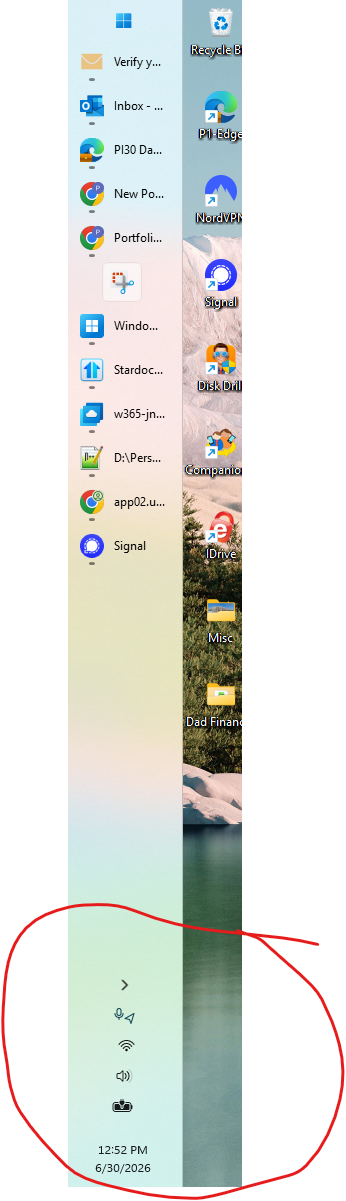
When I have external monitors connected to my laptop, and Start11 is running with the left align, the taskbar tray is frozen and I can't select anything in that area. This started happening recently:
140 views 6 replies
Reply #1 Top

Please update to Start11 2.73 beta which is available from your downloads on the Stardock Store as it should address this for you.

The issue is triggered by the preview release of Windows 11 you are using.

Reply #3 Top

I have the same problem, two weeks on from user above. Using latest v 2.73 (ARM64) with Surface Pro, lefthand taskbar and system tray. Taskbar works fine but system tray has been frozen since previous Start11 version.

Reply #4 Top
Quoting wwkelly, reply 3995607

I have the same problem, two weeks on from user above. Using latest v 2.73 (ARM64) with Surface Pro, lefthand taskbar and system tray. Taskbar works fine but system tray has been frozen since previous Start11 version.

End of wwkelly's quote

Hello,

Sorry to hear you are having issues. Please try, uninstall Start11, reboot immediately (important), download latest version v2.74 Beta, available in your account product download page: https://store.stardock.com/myaccount/products. Install it, reboot immediately again. Retest it and report back.

If the issue still appear please report back with more information on your system.

  1. Windows full version and OS Build number.
  2. Video on the issue might help us understand the issue better.

Thank you,

Basj,

Stardock Community  Assistant.

Reply #6 Top
Quoting wwkelly, reply 3995611

After installing v2.74 Beta, the system tray opens and problem resolved. Thank you

End of wwkelly's quote

Great. glad to hear that.

Thank you,

Basj,

Stardock Community  Assistant