
Why the Sins empire tree works

And how it could work in Ashes too

I just got Sins: Rebellion on Steam and now I can understand why Ashes has an Empire tree. To make the Ashes empire tree usable requires significant improvements from its current state in 0.71. I don't want to diminish this terrific effort by ASADDF, so I'm just going to talk about why I think the Empire tree in Sins works well, and how it can work better in Ashes.

1. Icons in the tree match the icons on the map. I know Ashes doesn't have icons on the map, and perhaps that is why the icons in the empire tree are currently of less value.
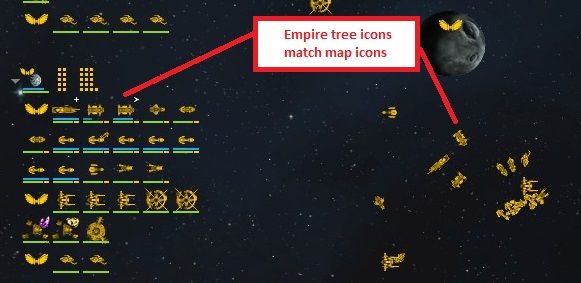


I am NOT advocating icons be added to the map for Ashes. I am advocating a designer rework of the Ashes unit icons so it is clear at a glance which ones are brutes, archers, Apollos, etc. I'm not a designer so I don't know how best to do this, but I bet someone at Stardock is smart enough to figure it out. For example, I'd bet fewer than 1/10 founders can tell me instantly what unit is represented by this icon:


2. Icons are grouped so that the same units are displayed side-by-side, allowing quick estimation of unit count. Using a number instead (as ASADDF recommended) is also possible, though you do potentially lose some useful info like health.


3. Each planet shows its own distinct list of unit icons so you know the precise size, strength, and composition of your forces in that particular area.


This works in Sins because the battle areas are logically separated. In Ashes regions have borders, but local units often straddle the borders. I have an idea for this at the end.

4. You can see the local buildings and resources. This can help you quickly estimate the local defensive capabilities, as well as production and economy value of a particular area.
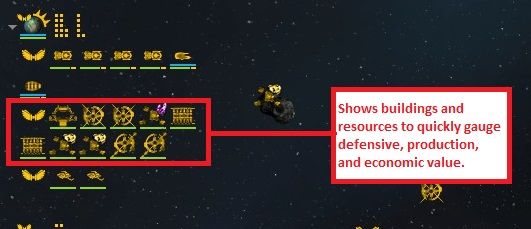


5. You get perfect knowledge of enemy forces at the planet, showing the size, strength, and composition of the local enemy force. From this you can 1. estimate whether you have appropriate local structures and units to win the battle, 2. determine the required counter forces you need to counter the local enemy forces.


----

Issue 1: One problem that could be addressed is the overloading of control groups. In Sins control groups are equivalent to a group of forces. But in Ashes control groups are also essentially physical locations. Ctrl-1 is my North defensive group, Ctrl-2 is my South push group. As the location of these control groups changes, you gain the context of where those units are now, but you lose context of where those units used to be. Therefore in the empire tree you lose the context of location, such as forward bases. In Sins, you always know the context of Planets because they are in the Empire tree.

Issue 2: For Ashes, the main issues with 3, 4, and 5 above is that you do not have distinct battle zones like you do in Sins. Furthermore for 5, your knowledge of enemy forces is restricted by line-of-sight.

The solution I recommend, which is not fully fleshed out, is user-definable sectors. This idea is inspired by Districts in Cities: Skylines - https://www.youtube.com/watch?v=K6Kw6302m9k (linking this video for content purposes only, not view boosting). With users able to define sectors the empire tree can display "local" forces and structures that exist within the sectors, both yours and those of the enemy's for which you have line-of-site. A less ambitious option would be for the sector borders to be built into the map design and not user-definable. Sectors would not have to follow region borders, but could instead be logical divisions of the terrain and gameplay progression. As long as the sectors are not too big, the units and buildings inside could be considered "local", and displayed under the sector in the empire tree.

Here is how you might draw out the sectors for one of your existing maps (obviously this is not how it would look to the user). For each sector where you have units, there would be a node in the empire tree displaying units, buildings, etc.


23,567 views 7 replies
Reply #1 Top

Two good options for a decent solution. I'd personally make the sectors bigger, though I realise yours is a visual example and not necessarily how you'd have it.

I agree sectors may be a better way to do it than individual armies. When you hit Space and bring up the overview map it would show the strengths of each sector either within each sector (preferred) or down the sides labelled with the sector letter. I think there is a lot of potential for the strategic map to show off a lot of useful info.


Not all will agree but TBH I don't think the Empire tree is needed at all for the small to fairly large maps. It could potentially become useful on huge and up sized maps. It has been mentioned that in the future we may have maps several times larger than the current largest we have. With that type of gigantic map the sectors system could work well.

But I also don't think you should force what is potentially a square into a round hole. Sins was very successful and to be able to tap into some of its features and its players is well understood (Look at the new Homeworld game, really trying to ape its predecessors in as many ways as possible to get the fans to accept and like the ground RTS. Seems to have worked), but please don't break your budget/manpower on something that currently no ones uses and may not strictly fit the game. If you find a way which adds to the game then that is great, but if it doesn't, well, that is OK too and you can leave it out. Or go somewhere between the two I guess.

Reply #2 Top

Thanks for writing this.  I'm digging into the empire tree today as a matter of fact.

Reply #3 Top

The only time I've used the Empire tree in Ashes is to find a PAN airscout. So far I haven't found any other use for it as it doesn't give me any information I can't find faster in other ways. Engineer - F1. Control groups for armies. I don't usually hotkey airscouts and their icon in the Empire tree is easy to spot amongst the others. The spacebar/tactical map helps me to quickly spot any units I may have forgotten about in some corner of the map. Right now, I don't see a purpose to the empire tree.

Eviator - I like your sectors idea. Sounds like this is so the Empire tree can display information on what is in each sector and divide it up rather than just be a long dump of everything you currently own? 

Reply #4 Top

this is awesome, i had that idea a while ago about Organizing The Empire Tree per region ala Sins, but there is a big problem here, is the Units Number. The Dev's are trying to make the Game Epic, with Thousands of units per side Right now my PC can handle around (4500 Logistics Before it Freezes) That does not mean 4500 Units, if we Put T1-T2-T3 Units Together so maybe we will get around 1k real Units (1000) The game does need a lot of optimization if they want to have more than 2k (2000) Units in the map at the same time on a Normal PC like mine.

OK going back to the Empire tree, Even if you Organize it per Region you still can put hundreds of units in a region and what happens if you see the Enemy in that region having the same number as you? lets say 200 vs 200 do the test, i did that test and its Crazy there is no way to know the numbers if you sit and read one by one, way to much.

In Sins the unit size are not that big as in Ashes so you can do that with no problem. that's why i created my Mockup, and i think so far is the best way to do it, I love Sins Empire tree that's why i want the Dev's to keep it but to make it better for ASHES, its their Decision how much time and money they want to put into that, but i think its very important for them to fix it. Putting the same Units into 1 Icon with a number next to it, I think it will be awesome because you can have a maximum of 12 different Icons per Group or region, and that will save a lot of space in the Empire Tree.

Reply #5 Top

Quoting Frogboy, reply 2

Thanks for writing this.  I'm digging into the empire tree today as a matter of fact.

Dont forget to code in the ability to switch it off completely, a thing sorely lacking in Sins.

Cause despite Eviators enthusiasm, there are actually people (like me :) ), who in SIns never use it, consider it pointless and only taking away precious screen space, since...

- i can pretty much see the icons of all the units and structures inside the gravity well i am looking at, no need to have them double highlighted  in some sheet on the side of the screen

- if its supposed to help me to have overview of the "content" of another gravity well, not the one i am currently zoomed onto, its not helpful, cause on a big map i am not going to find the planet i am looking for on that list anyway. Actually its easier to zoom out and find it on the map than scroll down the empire tree while looking for it. At least to me.

Then again, maybe in case of Ashes it would make more sense and would be way more useful.

Reply #6 Top

Has anyone of you guys played Sins with the Distant Stars Mod pack?

One of the many awesome things is that the fleet size is virtually unlimited. Your PC will break down before you hit the limit.

Therefore I can only confirm that these trees are not quite applicable for the amount of units planned to be in Ashes!

I highly recommend the Distant Stars Mod tough :D

Reply #7 Top

Quoting ASADDF, reply 4

 Putting the same Units into 1 Icon with a number next to it, I think it will be awesome because you can have a maximum of 12 different Icons per Group or region, and that will save a lot of space in the Empire Tree.

You've convinced me. Sort-of. A number is quick, but physical size comparisons are quicker. If the empire tree grew the size of the unit icon depending upon the number of units, it could also display an "average health" bar. Eh, the idea has some problems. I'm looking forward to the next iteration that the devs are currently working on.

I can't dismiss The posts of the others saying the tree may not make sense. Some good points.