Frogboy Frogboy

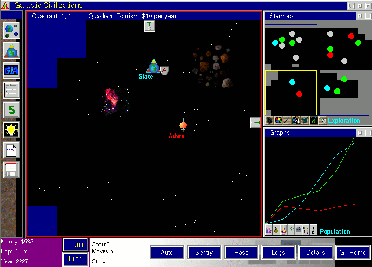
The evolution of the GalCiv UI

The evolution of the GalCiv UI

image

GalCiv I UI


image

GalCiv II BETA


image

GalCiv II release


GC3_Starmap_Default_Zoom

GalCiv III Alpha (final should look even better).

Visit www.galciv3.com to follow the continuing evolution of Galactic Civilizations!

174,356 views 58 replies
Reply #26 Top

Quoting Gaunathor, reply 25
that it's not that easy to achieve

Yes, not that EASY to achieve. The person I was quoting said there was no way.

If you get all the galactic achievements/trade goods that increase morale and have the best morale buildings plus perhaps some tech from other species that increases happiness, it is possible to have a large population, high morale and high tax rates. And playing at cakewalk level makes that all easy to achieve ;)

Reply #27 Top

Incredible how close galciv 2 ui came to the original idea.

Reply #28 Top

Quoting NitroX, reply 26
it is possible to have a large population, high morale and high tax rates.

Please define first what you consider those to be.

If you consider a population of 20b to be high, then that is perfectly achievable. WIllythemailboy, however, was talking about a population of 32.2b in his post.

I consider an approval value of 75%+, and a tax rate of 69%+ to be high.

A tax rate of 69% reduces morale by 96%. In order to keep an approval rating of 75%+, you need to have a rating of at least 171% before the tax penalty gets applied. On a high-PQ world with a population of 32b+, your morale bonus therefore needs to be at least 1510%. If it is a low- or mid-PQ planet, your morale bonus needs to be at least 1610%.

You can get your Morale ability to about 147% via racial techs and Trade Goods, if I'm not mistaken. Add in another 20% via race customisation. With six fully decked out Mining starbases, you can get another 234% (360%, if your playing the Thalan and have all factory techs). In total, that's 401% (527% for the Thalan). You still need another 1109% (983% for the Thalan). That's about 23 Torian Hot Springs (20 for the Thalan).

Considering that one tiles gets used up by the Initial Colony, and you need at least four Intensive Farming improvements to get a population of 32b, the min-PQ required for those planets is 28. Good luck finding many of those. However, this is also a big waste of money, because, if you're able to keep 32b happy, you could go all the way to 100b. The base approval doesn't change once you've reached 25b. However, finding a planet with a high enough PQ to do this is pretty unrealistic.

Quoting NitroX, reply 26
And playing at cakewalk level makes that all easy to achieve

I thought, we are talking about actually playing the game, not just fooling around. ;)

Reply #29 Top

I see Vulcan is in the game and I remember Hoth being in GCII any more "historical" worlds being added to the game?

Reply #30 Top

Become a founder elite then you can add 1 star of your choosing.  :thumbsup:

Reply #31 Top

Brad, how well will the UI scale with higher resolutions?


Right now, playing GC2 on 2560x1440 does make the font look small. The issue will become even bigger once 4K monitors become more common and multi-monitor setups continue to increase in player uptake.

Reply #32 Top

Quoting Illauna, reply 30
Become a founder elite then you can add 1 star of your choosing.


I know that is why I am one

Reply #33 Top

Those panels displaying the information are detachable and dockable too right?


backs out of the room slowly...    *_* :borg:

Reply #34 Top

Quoting UnleashedElf, reply 31

Brad, how well will the UI scale with higher resolutions?

Right now, playing GC2 on 2560x1440 does make the font look small. The issue will become even bigger once 4K monitors become more common and multi-monitor setups continue to increase in player uptake.

Would like to know if you could center the UI for Multi monitor setups, have an eyefinity 5760x1080 setup love it though very few games support it. the biggest problem with it most of the time is the UI is all the way of to the side of the screens, mostly play games in window if i can because of that. would be even better if you could customize the UI to a large extent.

Reply #35 Top

We will have multiple screen sizes for the UI, to make sure crazy high res monitors can still read text, and more importantly the UI should just get Crisper, at these higher resolutions. 

Reply #36 Top

I'll be honest, I like the minimap of GC2 Beta better than the GC2 one...

Reply #37 Top

I have to say, UI has come a long way from your previous games. It fits game really well and I like colors and opacity. Fonts looks really crisp and clear and I hope, UI will be scalable on different resolutions. It seems like you have learned a lot !! good job :-)

Reply #38 Top

Quoting Seleuceia, reply 36

I'll be honest, I like the minimap of GC2 Beta better than the GC2 one...

I agree with you there. Ah well too late for that. The GalCiv3 Ui looks amazing. 

Reply #39 Top

Quoting mormegil, reply 35

We will have multiple screen sizes for the UI, to make sure crazy high res monitors can still read text, and more importantly the UI should just get Crisper, at these higher resolutions. 

Very cool to hear. One thing that drives me crazy about the Elemental UI is it's non-scaling based on resolution. It's designed for a tiny resolution and that makes it much less useful on higher resolution monitors.

Thinking about this from a web design perspective, responsive web design is all the rage now, where websites change layout (and size) based on resolution. Is this kind of like what you're talking about, mormegil?

Reply #40 Top

Quoting mormegil, reply 35

We will have multiple screen sizes for the UI, to make sure crazy high res monitors can still read text, and more importantly the UI should just get Crisper, at these higher resolutions. 

I'd like to see GalCiv III to support 4K displays in a meaningful way.

Reply #41 Top

Quoting Omnax1, reply 37

I have to say, UI has come a long way from your previous games. It fits game really well and I like colors and opacity. Fonts looks really crisp and clear and I hope, UI will be scalable on different resolutions. It seems like you have learned a lot !! good job

A lot of this is the DirectX 10 support. MS changed the way fonts work in games between DirectX 9 and 10 and you can really see the difference.

Reply #42 Top

Hmm. Not one question regarding the Find button.

Reply #43 Top

Quoting Frogboy, reply 42

Hmm. Not one question regarding the Find button.

What Find button? o_O

I assumed you use the tabs below the minimap to find everything. There are already several categories to sort the colonies, so the other tabs will probably have them too. That should make finding colonies, ships, and the like, easy enough.

Or am I totally wrong with my assumption? <_<

Reply #44 Top

Quoting Frogboy, reply 42

Hmm. Not one question regarding the Find button.

Is that the fourth tab in the colony list box? The exclamation point in a circle thing? I speculated that it might be an event tracker or something in reply #19. Or is it possibly the tab next to that with a list type icon?

There's no button explicitly marked "Find", otherwise we'd be all over that :)

Reply #45 Top

Look at the UIs from each GalCiv closely. :)


Here's a link to the OS/2 version even:


No Find button in GalCiv III.

Reply #46 Top

Quoting Frogboy, reply 45
No Find button in GalCiv III.

Wow, totally wasn't looking for things that should be there but aren't.

There must be another feature that will serve the same purpose, otherwise we'll be misplacing fleets faster than change vanishes into a couch.


Reply #47 Top

I assumed it was gone as ships can now finish their autopilot and remaining moves automatically?

Edit: or the end turn button might change text and serve a dual purpose like some other games! ;)

Reply #48 Top

BTW, Master of Orion and GalCiv came out at around the same time back in the early 90s.

Here's what MOO 1 looked like:

Note that this isn't a thumbnail. That's actual size.

The GalCiv image from above had to be shrunk to fit on the page.  That's because it was 1024x768x24bit color while DOS games were 320x200x256.

Ah, OS/2.  As a gaming platform in 1993, it was so so far ahead. It's a shame IBM didn't know how to market it.

Reply #49 Top

Then there was the Amiga, that was on at least a similar level in the eighties I think, but failed because it lost the marketing war with Nintendo etc. (IBM Compatible PCs were way behind for a long time after until they finally caught up and overtook where the Amiga had been).

Reply #50 Top

I think the constraints MOO had to work with for hardware forced them into making an interface that was streamlined. It's easy to over-design a UI just like it is to leave out critical info. The new Gal Civ 3 screens seem to be striking a good balance, especially if the UI scales somewhat.

This hasn't been mentioned yet, but will there be the ability to toggle graphical overlay info easily? I know some of those things have been in the Options, but I'm thinking of SimCity where you could easily switch on and off info that's meaningful. I really like that presentation of info instead of burying those options in Settings.