




Solution: Graphics Gone Wild.
for ATI users with bonkers graphics.
http://downloads.guru3d.com/ATI-Tray-Tools-1.3.6.1042-download-733.html
from  Demigod Forums
Demigod Forums
you'll find this thread useful if;
- you have an ATI card of some flavour,
- your Demigod looks like this;
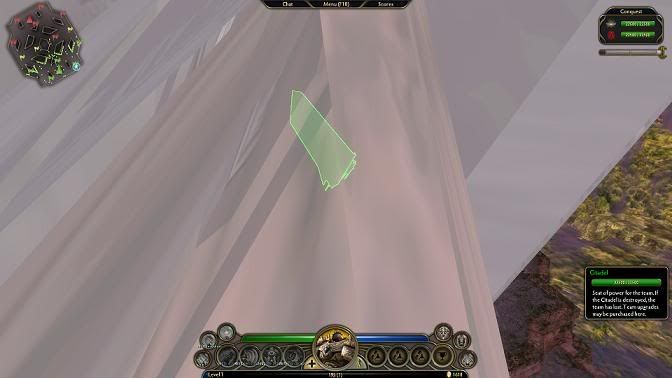
this just happens to be caused by, a clever little performance improving, technology called Geometric Instancing being disabled on your card. it appears that the Moho Engine (used in both SupCom and Demigod) makes use of this, and it vainly tries to continue even when it's been disabled.
as you can see; the results are amusing, but not at all useful for play.
fortunately, it's rectified with no further ill effects by re-enabling Geometric Instancing at any point in time.
now, if you're a sufferer of a lack of Instancing, here's a simple tutorial on fixing it;
- download ATI Tray Tools, as per my external link (don't worry, you can uninstall it later),
- install it (well, duh),
- you'll likely be asked to turn off some services (namely; ATI HotKey Service) in order to do something about low-level overclocking
- don't disable them unless you plan on making further use of ATITool,
- disabling them doesn't contribute anything to fixing your graphics.
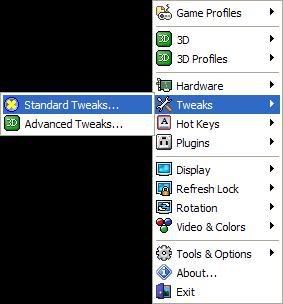
- once ATITool is up and running, point to Tweaks -> Standard Tweaks,
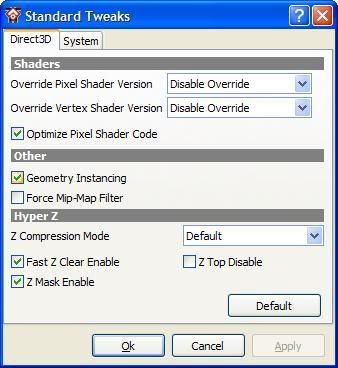
- tick Geometry Instancing,
- as an optional extra you may want to Enable/Toggle 'Optimise Pixel Shader Code',
- someone (who helped with this tutorial, thanks goodgimp) found toggling this for a short length of time was also required.
- ???
- profit.
DO NOT REPLY TO THIS THREAD,
AT ALL!
if the tutorial hasn't worked, make a new thread and tell us that you've already tried this.
i know i'm awesome and all, but leave your thanks to the Karma system instead.
[PS:] something that wasn't mentioned; this applies to the DG beta, AND to the finished product. it's not a bug per-say with the game, as such; don't expect to see a fix made by GPG.
GL; HF.


 Stardock Forums